Site Specific Configuration
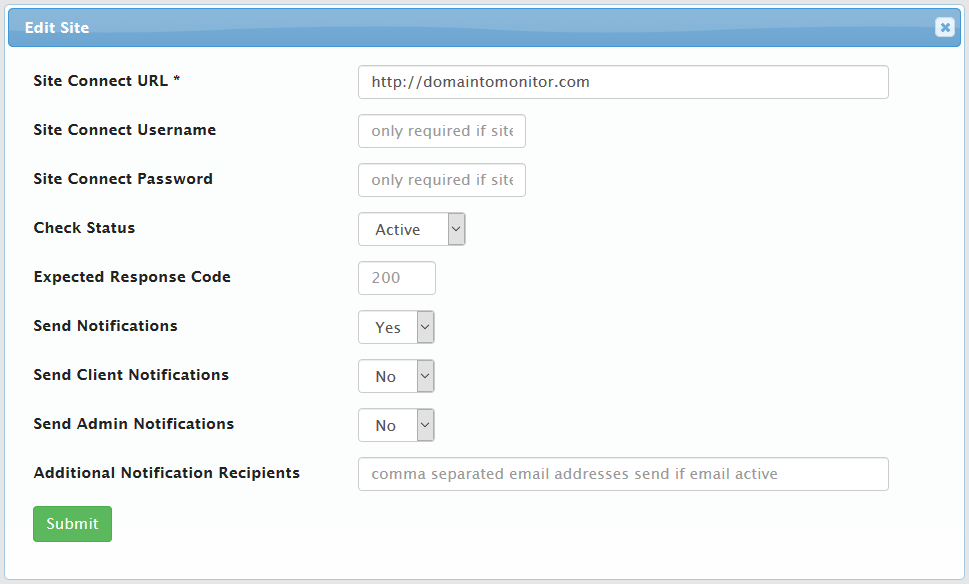
Site monitors are created and managed from the main Addon page or from the Hosting Product View.
-
Client
When creating a new site monitor from the main Addon page, you will be prompted to optionally select a Client. From the Client Hosting View, the site monitor will be automatically associated with the client. Once associated, the client cannot be changed.
-
Site Connect URL
This is the site url that will be checked for availability. You may use an
httporhttpsformatted url (eg: https://www.holodyn.com/). If the site is protected by Basic HTTP Authentication, then you select Requires Authentication to expose the optional Username and Password fields. -
Site Connect Username
If the site requires HTTP authentication, then enter the username here.
-
Site Connect Password
If the site requires HTTP authentication, then enter the password here.
-
Check Status
Toggles whether the site is active or inactive, which controls site inclusion in the cron job.
-
Expected Response Code
200 is the expected response code by default. You may enter any response code (including custom codes) that will be considered successful a response.
-
Send Notifications
Toggles the sites email notification system. No emails will be sent to admins, clients, or anyone in the global CC list when inactive.
-
Send Client Notifications
Toggles a client's notification for the site.
-
Send Admin Notifications
Toggles an admin's notification for the site.
-
Additional Notification Recipients
This comma separated list of emails will receive site notifications.