Configuration
General Configuration
General configuration can be found by navigating to Setup > Addons Modules, scrolling down to Site Monitor and clicking configure.
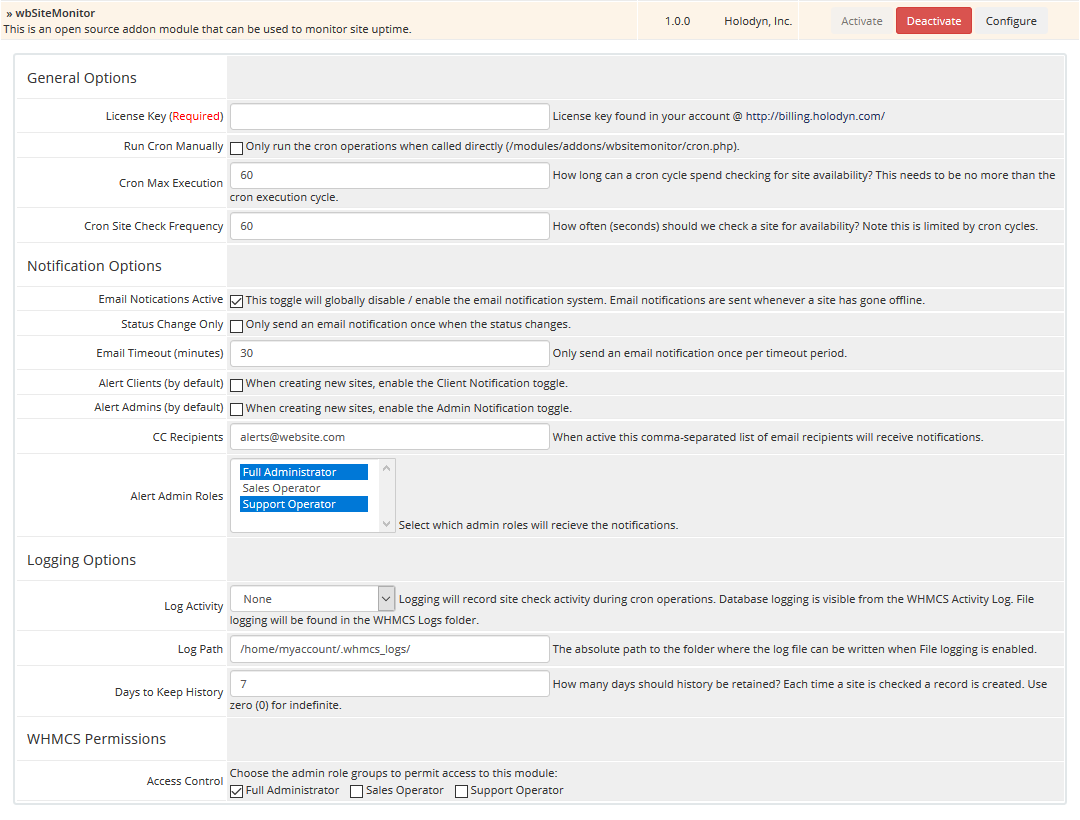
License Key
You are required to enter your License Key, which can be found by visiting the Services area of your account at https://billing.holodyn.com.
Cron Settings
Each cron execution will check as many sites as possible before the Cron Max Execution is reached. Sites are checked for availability one at a time, so a site that responds slowly will weigh against the total execution time. Each site is checked in a round-robin fashion, so slow website responses will affect the speed at which the total list of sites is processed. Sites are only checked once per cycle, and checked only as often as the Cron Site Check Frequency allows.
-
Run Cron Manually
The standard WHMCS cron job is designed to run every 5 minutes. By default, Site Monitor will run with the standard WHMCS cron. If you wish to run the Site Monitor on a different interval, you can choose to Run Cron Manually which will cause Site Monitor to only run when you call it directly. For example, to run the cron every minute you would setup a cron with similar settings:
*/1 * * * * php -q /home/website/public_html/modules/addons/wbsitemonitor/cron.php -
Cron Max Execution
Limits (in seconds) how long a single cron operation may execute, which combined with Site Check Frequency translates into the number of sites that may be checked for availability.
Check Frequency
-
Site Check Frequency
Limits how long to wait (in seconds) to check a website after the last successful availability check. The actual check frequency is dependent and the number of websites to check will also play a factor in the freqency.
-
Continuous Offline Site Check
Ignores the Site Check Frequency delay for sites that are identified to be offline and instead check as often as possible.
Monitor Experience
-
Automated Monitoring
Imports and monitors domains and hosting services that are created in the system automatically. It also disables monitoring for domains or services that expire.
-
Visible to Client
Includes monitor status and history on the client dashboard. It is superceded when the client has purchased a product using the site monitor server module.
Notification Options
Site Monitor notifications are handled using WHMCS's email system. The settings in the General Configuration that can be overridden on a site by site basis are noted in the short descriptions below.
-
Email Notifications Active
Toggle that globally disables / enables the email notification system. Email notifications are sent whenever a site has gone offline. Additional settings below can offset the number of emails sent.
-
Email Delay (minutes)
Sends an email notification only if the site is offline for a delay period.
-
Email Timeout (minutes)
Sends an email notification only once per timeout period. It helps limit the number of emails sent.
-
Only Once per Change
Toggles whether to only send an email notification once for every time the status cycles from online to offline.
-
Alert Clients
Toggles whether or not the associated client receives a notification email by default.
-
Alert Admins
Toggles whether or not administrators receive a notification email by default.
-
CC Recipients
Sets a comma-separated list of email addresses to cc when notifications are sent. These recipients will receive alerts regardless of the client and admin alert options.
-
Alert Admin Roles
Selects administrator roles to receive email notifications.
Logging Options
-
Log Activity
Logging will record site check activity during cron operations. Database logging is visible from the WHMCS Activity Log. File logging will be found in the WHMCS Logs folder.
-
Log Path
The absolute path to the folder where the log file can be written when File Logging is enabled.
-
Days to Keep History
How many days should history be retained? Each time a site is checked a record is created. Use zero (0) for indefinite.
WHMCS Permissions
This option is the standard WHMCS access list that limits which administrator roles have access to this addon.